
All the Claude Plugins and Skills, Mapped: What Each One Does, in Plain English
By AI Business Partners · 14 Oct 2026
Last updated: 14-Oct-2026. We refresh this page every couple of weeks, because Anthropic's catalogue changes almost every week.
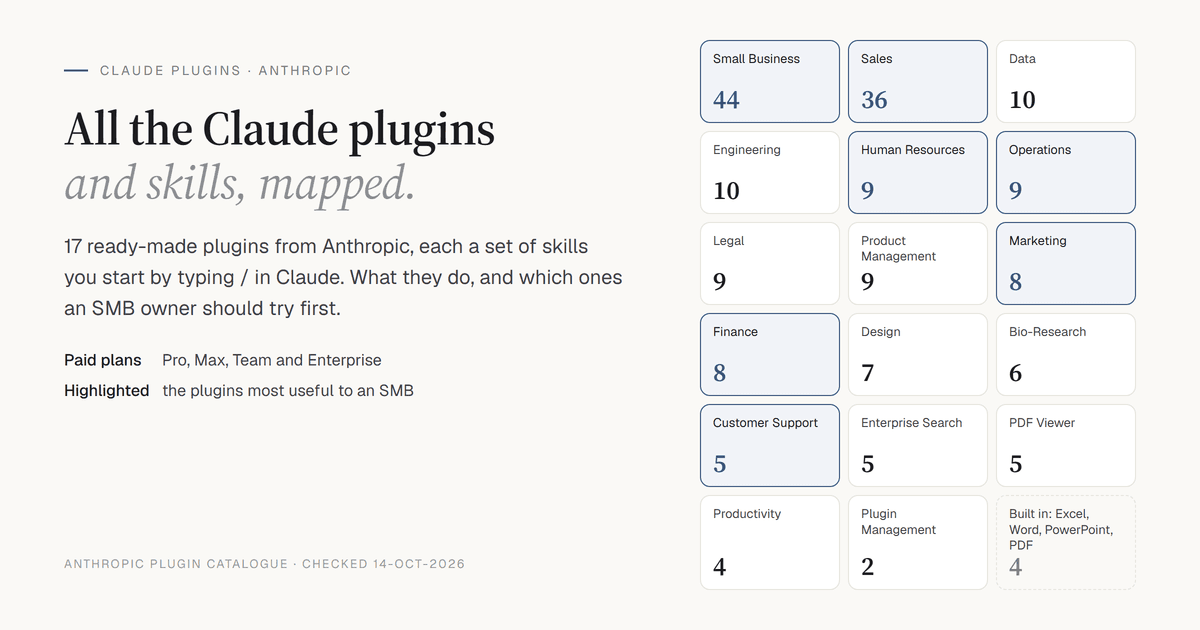
Anthropic ships 17 ready-made plugins for Claude — Sales, Marketing, Finance, Human Resources, Operations, Small Business and more — each holding a set of skills you start by typing a forward slash, /, in Claude. On top of these sit Claude's built-in skills, Anthropic's library of example skills, partner plugins and the skills built into Claude Code.
This page is the complete map. It starts with how to switch plugins and skills on, then lists every one of them with what it does, in plain English.
Skills and Plugins, in Plain Words
A skill is a saved set of instructions for one job, written down once so you never have to type it again. Each skill carries a one-line description. Claude reads that line to decide when the skill applies — so it uses a skill on its own when your request matches, or you call it by name with /.
A plugin is a bundle of skills for one kind of work, plus connectors — links to the tools that work needs, such as your email, calendar or CRM (the software where you keep your customer and sales records). Anthropic's plugins are made entirely of text files. No code.
Think of a plugin as a trained assistant who arrives with a checklist for every routine task in one department.
How to Switch Them On
1. Check Your Plan
Plugins are available on Claude's paid plans: Pro, Max, Team and Enterprise.
2. Install a Plugin
In Claude on the web or in the Claude desktop app, open Customize → Plugins, or browse claude.com/plugins, and install the plugin you want. Its skills appear straight away.
On Team and Enterprise plans, the account owner sets each plugin for the whole organisation to one of four options: Installed by default, Available, Required or Not available.
3. Switch On Code Execution for the Document Skills
Claude's built-in Excel, Word, PowerPoint and PDF skills need code execution turned on:
- Free, Pro and Max: Settings → Capabilities.
- Team and Enterprise: Organisation settings → Plugins & skills.
4. Use a Skill
- In any chat, type / or click +. Claude lists every skill from your installed plugins.
- Pick one, or type its full name: the plugin, a colon, then the skill — for example /sales:call-prep. The tables below give every full name, so you can type it exactly.
- You do not always have to call a skill. When your request matches a skill's description, Claude uses it automatically.
5. See What You Have
Open Customize → Plugins and Customize → Skills. Your own account's list is the final word on what you can use today.
Where Plugins and Skills Work
Skills work in four places: Claude chat on the web, the Chat tab of the Claude desktop app, Cowork (the desktop app's mode for longer, hands-on tasks) and Claude Code. Some plugins also carry hooks (actions that run automatically at set moments), sub-agents (helper assistants that take on part of a job) and their own local connectors. Those run only in Cowork and Claude Code; in chat they appear greyed out.
For a guided start, type /setup-claude (or /setup-cowork in Cowork): pick your role, install a matching plugin, try one of its skills and connect your tools.
In Claude Code
Plugins and Anthropic skills you install on claude.ai appear in Claude Code automatically, from version 2.1.273 onwards. Anthropic's skills show there as anthropic-skills:<name> — for example anthropic-skills:pdf. Run /skills to see them, /plugin (Discover tab) to browse more, and /help for everything else.
To install Anthropic's business plugins directly in Claude Code:
claude plugin marketplace add anthropics/knowledge-work-plugins
claude plugin install <name>@knowledge-work-plugins
To add Anthropic's example and document skills: /plugin marketplace add anthropics/skills, then install document-skills@anthropic-agent-skills or example-skills@anthropic-agent-skills.
The Whole Map at a Glance
| Plugin | Skills | Built For |
|---|---|---|
| Small Business | 44 | Running and growing an owner-run business |
| Sales | 36 | Prospecting, calls, deals and pipeline |
| Data | 10 | Questions about your numbers, charts and dashboards |
| Engineering | 10 | Software teams |
| Human Resources | 9 | Hiring, onboarding, reviews and policy |
| Operations | 9 | Processes, suppliers, risk and reporting |
| Legal | 9 | Contracts, NDAs and compliance |
| Product Management | 9 | Specs, roadmaps and user research |
| Marketing | 8 | Campaigns, content, email and SEO |
| Finance | 8 | Reconciliations, statements and month-end close |
| Design | 7 | Design reviews, UX writing and accessibility |
| Bio-Research | 6 | Life-sciences research labs |
| Customer Support | 5 | Tickets, replies and help articles |
| Enterprise Search | 5 | Searching across all your connected tools at once |
| PDF Viewer | 5 | Marking up, filling and signing PDFs |
| Productivity | 4 | Tasks, day planning and memory of your work |
| Plugin Management | 2 | Building and customising your own plugins |
On top of these, every Claude user gets four built-in document skills — for Excel, Word, PowerPoint and PDF files — which Claude uses automatically.
Where an SMB Owner Should Start
You do not need all 17. For a typical owner-run business, start with one of these, whichever matches the work you repeat most:
- Sales — /sales:call-prep before a call, /sales:call-summary after it, /sales:daily-briefing every morning.
- Small Business — /small-business:smb-onboard to set it up, then /small-business:monday-brief, /small-business:invoice-chase or /small-business:cash-flow-snapshot. You approve every step that touches money or customers.
- Finance — /finance:reconciliation to match your books against the bank.
- Human Resources — /human-resources:draft-offer and /human-resources:onboarding when you hire.
- Operations — /operations:process-doc to turn "how we do it" into a written SOP (standard operating procedure).
- Marketing — /marketing:campaign-plan for a full campaign brief.
- Customer Support — /customer-support:draft-response for tricky customer replies.
Install that one plugin, type /, and run one skill on a real task this week. Judge it on that.
The Full Catalogue
Sales — 36 Skills
Prospecting, outreach, deal strategy, call preparation and pipeline management. Many of these skills read from and write to your CRM, so they get far more useful once it is connected.
| Type This | What It Does |
|---|---|
| /sales:account-context | Everything about an existing customer in one brief: CRM records, recent emails, documents, call transcripts and internal chat. |
| /sales:account-plan | Builds or refreshes a plan for a key customer — where things stand, goals, who you know there, opportunities, risks and next actions — saved to a document, with key fields updated in your CRM. |
| /sales:account-research | Researches a target company or person: overview, recent news, likely priorities, and how well they fit your ideal customer, checked against your CRM. |
| /sales:account-tiering | Scores a list of accounts on fit and engagement and sorts them into priority tiers. |
| /sales:call-prep | A brief before a call: who is attending, the account history, what was said last time, where the deal stands, and questions to ask. |
| /sales:call-summary | Turns a call transcript or your notes into a follow-up email for the customer, a short summary for your team, and suggested CRM updates. |
| /sales:close-plan | The business case for a deal and a shared plan with the customer: why buy, why now, the return, and dated steps to signature. |
| /sales:competitive-intelligence | How to win a deal against a named competitor, plus patterns in your wins and losses and one-page comparison sheets. |
| /sales:create-an-asset | Builds a customer deck, one-pager or leave-behind from your account data and approved material, without inventing numbers. |
| /sales:crm-hygiene-check | Checks your CRM deals for missing fields, out-of-date dates and wrong stages, and gives you a fix list. It only reads; it changes nothing. |
| /sales:customer-health | A health check on a customer, and preparation for a quarterly review: relationship strength, engagement trend, warning signs, value delivered, agenda. |
| /sales:customer-voice | Pulls customer quotes on a topic from call transcripts and emails across accounts, with who said each one. |
| /sales:daily-briefing | A morning rundown: today's meetings, deals closing soon, customer emails waiting on you, and your top actions. |
| /sales:deal-advance-gap | What is missing to move one deal to the next stage and to close, with owners and dates. |
| /sales:deal-review | A deep look at one deal: a health score adjusted for warning signs, risks, gaps in what you know, and next actions. |
| /sales:deal-signals | Alerts across all your deals: ones gone quiet, close dates slipping, your main supporter at the customer changing, renewals, competitor mentions. |
| /sales:deal-slip-scenario | If a deal slips, shrinks or dies: what that does to your target, and how much replacement business you need. |
| /sales:draft-outreach | Drafts a personalised email, or a series of emails, to a prospect — left as a draft for you to send. |
| /sales:end-of-day | Closes out the day: processes your calls, updates the CRM, captures what you promised, and sets tomorrow's top three. |
| /sales:expansion-whitespace | Where you could sell more to existing customers, with the evidence for each idea. |
| /sales:forecast | The story behind your sales forecast — committed, best case and pipeline — for a forecast call or a meeting with your manager. |
| /sales:handle-objection | Helps you answer a live objection or competitive threat, using your win/loss history and customer quotes. |
| /sales:inbox-sweep | Works through unread customer emails: sorts them, puts them in order of priority, and drafts replies. |
| /sales:lead-triage | Scores a new enquiry and decides where it should go, or ranks a backlog of enquiries, against your ideal customer and qualifying rules. |
| /sales:log-activity | Records a call, meeting or email in your CRM against the right records. |
| /sales:pipeline-review | A stage-by-stage health check of your pipeline: enough deals to hit target, how long deals have sat, conversion, deals at risk. |
| /sales:renewal-radar | Upcoming renewals, with timing, risk and room to grow. |
| /sales:rep-context | For a sales manager's one-to-one with a salesperson: their pipeline, recent activity and where they may need help. |
| /sales:route-lead | Decides who should own an unassigned lead using your rules, and drafts the handover note. |
| /sales:schedule-meeting | Finds a time, drafts and books the invite on Google Calendar or Outlook, and logs it to your CRM. |
| /sales:setup | First-run setup: checks your connected tools, learns your writing style from your sent emails, and shows a starter dashboard. |
| /sales:stakeholder-map | Maps the people in a deal: their roles, influence, attitude, the gaps, and how to reach them. |
| /sales:team-pipeline | A manager's view: the team's pipeline by person and stage, deals at risk, and coaching moments. |
| /sales:update-opportunity | Guided updates to a deal — stage, close date, next steps, amount — showing before and after. |
| /sales:weekly-wrap | An end-of-week summary of what closed, moved, slipped and what is next; can draft a post for your team chat. |
| /sales:win-loss-review | Looks for patterns in recently won and lost deals. Aimed at sales leaders. |
Small Business — 44 Skills
Ready-made workflows for running and growing a business, built to work with the tools you already use, with you approving every step that touches money or customers. If you run an owner-led business, this is the plugin to look at first. Many skills are built around accounting and payment tools such as QuickBooks, Xero, Zoho Books, Stripe, PayPal and Shopify, and several work from an uploaded spreadsheet when nothing is connected. The two tax skills cover US tax only.
| Type This | What It Does |
|---|---|
| /small-business:ad-manager | Reads how your paid ads are doing, explains in plain English what works and what is wasting money, recommends budget, targeting and creative changes, and drafts new ad copy. Makes changes in your ad account only after you say yes. |
| /small-business:ap-processor | Works through the bills you owe: reads them from your inbox, PDFs or phone photos, pulls out supplier, amount and due date, codes each one, matches it to the purchase order, and stages entries and a payment run in your accounting software for you to approve. |
| /small-business:brand-style | Sets your brand look — from your website link or a plain description — and how you like your outputs delivered, so every page and document the plugin makes follows it. |
| /small-business:build-agent | Turns a task you keep doing by hand into a reusable skill you can call by name or put on a schedule, with approval checkpoints in the right places. |
| /small-business:build-connector | Connects Claude to a tool that has no official connector, through Zapier, with your approval needed before anything is written. |
| /small-business:business-pulse | A one-page snapshot of the business: cash, sales trend, pipeline, this week's commitments, urgent items, and the single most important thing to deal with today. |
| /small-business:call-list | Builds today's call list: ranks the five leads most worth calling, gives talking points from past emails, blocks time on your calendar and drafts follow-ups. |
| /small-business:canva-creator | Runs an approved campaign brief end to end: posting calendar, Canva designs for social posts, captions and email copy — every step needs your approval. |
| /small-business:cash-flow-snapshot | Forecasts your cash flow for the next 30, 60 and 90 days from your accounts or payment data, with risk flags. Answers "will I make payroll?" and comes with a spreadsheet. |
| /small-business:close-month | Closes the books in three steps: reconciles your accounts, refreshes the cash forecast from the closed numbers, then publishes the month-end pack. |
| /small-business:content-strategy | Looks at what is selling and what is not, adds seasonality, and gives you a 30-day plan of what to promote, which offers to run and what to hold back. |
| /small-business:contract-review | A light review of NDAs, service agreements and supplier contracts for businesses without a lawyer on staff: flags unusual terms, explains the risks in plain English, and gives you a marked-up copy in Word. |
| /small-business:crm-autopilot | Keeps your CRM up to date without you opening it: creates contacts and deals from email, calendar and calls, logs activity, drafts follow-ups on quiet deals, and cleans out duplicates. Can build a simple CRM in a spreadsheet if you have none. |
| /small-business:grant-rfp-writer | Finds grants and tenders you actually qualify for, decides go or no-go before anyone writes, drafts the application from past submissions, and tracks every deadline. Built for nonprofits, government contractors and education. |
| /small-business:grow-pipeline | Fills your sales funnel end to end: reads the market, builds a ranked list of named prospects with a reason for each, writes outreach in your voice, and logs every touch to the CRM — with your approval at each step. |
| /small-business:growth-pulse | Answers "is our growth engine working?": sales by channel, conversion, campaign return, best and worst products, and customer sentiment, ending with three growth actions for this week. |
| /small-business:hiring-screener | Turns a pile of job applications into a ranked shortlist scored against the job's own criteria, drafts replies to every candidate, schedules interviews, and prepares an onboarding checklist. |
| /small-business:inbox-manager | Turns a full inbox into a short ranked list of what needs you, drafts replies in your voice, pulls out actions and deadlines, and passes bills, leads and meeting requests to the right skill. |
| /small-business:inventory-planner | Works out what to reorder and when from what is actually selling: sales speed per item, likely stock-out dates, reorder quantities, and draft purchase orders. Also flags stock that is not moving. |
| /small-business:invoice-chase | Drafts reminders for overdue invoices, matched to each customer's payment history — gentle for good payers, firm for repeat late payers. Nothing is sent without your approval. |
| /small-business:job-post-builder | Builds a hiring pack from a short brief: job advert, structured interview guide with scoring rubric, and an offer-letter template. |
| /small-business:lead-finder | Builds a ranked list of prospects worth contacting: works out your ideal customer from the ones you already have, finds look-alike companies and the right person at each, and delivers the list as a spreadsheet. |
| /small-business:lead-triage | Scores new leads in HubSpot by engagement, fit and urgency, ranks who to call today with talking points, drafts follow-ups and suggests times to book. |
| /small-business:marketing-monday | A weekly growth briefing on one page: is marketing working, what customers are saying, what competitors changed, and three growth actions for the week. |
| /small-business:monday-brief | Your Monday morning briefing on one page: cash, sales and pipeline, your saved reports, and the week ahead from your calendar and email. |
| /small-business:month-end-prep | Reconciles your accounts against your payment and sales platforms, flags problems, duplicates and missing receipts, and writes a plain-English profit-and-loss story with a month-end pack. |
| /small-business:outreach-composer | Writes outreach and follow-up emails that sound like you, learned from your own sent mail, each grounded in something specific about the prospect. Every send waits for your approval. |
| /small-business:pay-the-bills | Takes bills from your inbox to a ready payment run: codes every bill, checks your cash before any money is committed, then stages the run for your approval. Coding and paying are two separate approvals. |
| /small-business:payroll-prep | Gets payroll ready: totals regular, overtime and leave hours per person, flags anomalies such as missed punches or rate changes, and stages the run for you to approve line by line. |
| /small-business:plan-payroll | Makes sure payroll is covered: forecasts cash over the payroll period, chases overdue invoices to close any gap, then prepares the payroll run. |
| /small-business:proposal-builder | Turns a call transcript, voice memo, site photos, tender document or rough notes into a branded, costed proposal or estimate using your own templates and past pricing, then sends it for signature. |
| /small-business:reactivate | Wins back customers who have quietly stopped buying: finds them, ranks them by what they were worth, drafts a win-back message in your voice, and sends only what you approve. |
| /small-business:report-builder | Turns a plain-English description of a regular report — say, sales by location against last year — into a repeatable report with a spreadsheet, rerun on demand or on a schedule. |
| /small-business:report-pack | Delivers your saved reports on a set schedule, with a business snapshot around them for context. |
| /small-business:restock | Turns what is selling into a reorder: sizes it, drafts the purchase order and supplier email, and records it so the bill matches when it arrives. Flags dead stock too. |
| /small-business:review-reputation | Gathers what customers say in Google, Yelp and Facebook reviews, complaints and email into themes with real quotes, drafts a reply to every review for your approval, and spots customers likely to leave. |
| /small-business:seo-ai-visibility | Checks and fixes how findable you are, both on Google and in AI assistants' answers: rankings, site structure, speed, page titles, and whether AI tools can read your site. |
| /small-business:smb-onboard | Sets you up: connects your first two tools, runs one task to show value straight away, interviews you about your business so every other skill knows it, and sets a weekly check-in. |
| /small-business:smb-router | The front door to the plugin: listens to what you need, sends you to the right skill, and suggests what to try next. |
| /small-business:social-content-engine | Runs your social media as an ongoing operation: a rolling posting calendar, on-brand Canva graphics, captions in your voice, one asset reworked for every channel — staged for your approval, never posted on its own. |
| /small-business:speed-to-lead | Makes sure no enquiry goes unanswered: watches web forms, the shared inbox and the CRM, qualifies each enquiry, drafts a reply with real meeting times, and flags hot ones to a person immediately. Never sends on its own. |
| /small-business:tax-prep | Prepares tax material once the books are closed and reconciled. US federal tax only. |
| /small-business:tax-season-organizer | Prepares tax-season material for your accountant — not tax advice. US federal tax; a business outside the US gets its closed-books pack instead. |
| /small-business:ticket-deflector | Reads a forwarded customer email or ticket, checks the order, refund status and account history, drafts a reply in your voice, and can issue a refund — only with your explicit approval. |
Marketing — 8 Skills
| Type This | What It Does |
|---|---|
| /marketing:brand-review | Checks a draft against your brand voice, style guide and key messages; flags problems by how serious they are, suggests fixes, and screens for legal issues. |
| /marketing:campaign-plan | A full campaign brief: goals, audience, message, channels, content calendar and how you will measure success. |
| /marketing:competitive-brief | Researches competitors and compares their positioning and messages with yours: gaps, opportunities, threats. |
| /marketing:content-creation | Drafts marketing content for any channel: blog, social, newsletter, landing page, press release, case study. |
| /marketing:draft-content | Drafts content formatted for the channel, with search-engine suggestions and headline or subject-line options. Overlaps with content-creation. |
| /marketing:email-sequence | A series of emails with the copy, timing, branches and when to stop. |
| /marketing:performance-report | A marketing report with numbers, trends, what worked and what didn't, and recommendations in priority order. |
| /marketing:seo-audit | A check of how findable your website is on Google: keywords, page-by-page review, content gaps, technical checks and a comparison with competitors. |
Finance — 8 Skills
Anthropic states that finance outputs must be reviewed by a qualified financial professional. Treat them as a first draft for your accountant. Some skills are built around US rules (SOX, a US law on financial controls in listed companies).
| Type This | What It Does |
|---|---|
| /finance:audit-support | Support for a US SOX controls audit: how to test controls, which samples to pick, how to document. |
| /finance:close-management | Plans the month-end close: what happens in what order, what depends on what, and where each step stands. |
| /finance:financial-statements | Profit and loss, balance sheet and cash flow, compared with the previous period, with big changes flagged. |
| /finance:journal-entry | Prepares accounting entries — accruals, depreciation, revenue — with debits, credits and supporting detail. |
| /finance:journal-entry-prep | Accounting entries with supporting documents for month-end close. Overlaps with journal-entry. |
| /finance:reconciliation | Compares your ledger balances with bank statements, sub-ledgers or outside data, and sorts out the differences. |
| /finance:sox-testing | Sample selections, testing working papers, and grading of control weaknesses for a US SOX audit. |
| /finance:variance-analysis | Explains why a number moved, driver by driver, in words and as a waterfall chart. |
Human Resources — 9 Skills
| Type This | What It Does |
|---|---|
| /human-resources:comp-analysis | Compares pay with the market, places people in pay bands, and models equity. |
| /human-resources:draft-offer | Drafts an offer letter with pay and terms, plus advice on negotiating. |
| /human-resources:interview-prep | A structured interview plan: questions tied to the skills you need, and a scorecard. |
| /human-resources:onboarding | A joining checklist, first-week plan and 30/60/90-day goals for a new hire. |
| /human-resources:org-planning | Headcount planning, organisation design and team structure. |
| /human-resources:people-report | Reports on headcount, people leaving, diversity or organisation health. |
| /human-resources:performance-review | Self-assessment, manager template, and preparation for review meetings. |
| /human-resources:policy-lookup | Finds and explains your company policies in plain language. |
| /human-resources:recruiting-pipeline | Tracks candidates through each hiring stage. |
Operations — 9 Skills
| Type This | What It Does |
|---|---|
| /operations:capacity-plan | Workload and capacity: who is stretched, who has room, and what is coming. |
| /operations:change-request | A request for a business change, with its impact and a plan to undo it if it goes wrong. |
| /operations:compliance-tracking | Tracks compliance requirements and audit readiness for standards such as SOC 2, ISO 27001 and GDPR. |
| /operations:process-doc | Documents a process as a flowchart, a who-does-what chart and a standard operating procedure (SOP). |
| /operations:process-optimization | Finds and fixes slow or wasteful processes. |
| /operations:risk-assessment | Identifies, rates and reduces operational risks, including a risk register. |
| /operations:runbook | Creates or updates a step-by-step guide for a routine or emergency task. |
| /operations:status-report | A status report with key numbers, risks and action items. |
| /operations:vendor-review | Evaluates a supplier on cost, risk and total cost of ownership, with a recommendation. |
Customer Support — 5 Skills
| Type This | What It Does |
|---|---|
| /customer-support:customer-escalation | Packages a customer problem for your technical team, product team or leadership, with full context. |
| /customer-support:customer-research | Researches a customer question across several sources, showing where each answer came from. |
| /customer-support:draft-response | Drafts a reply suited to the customer, the situation and the relationship. |
| /customer-support:kb-article | Turns a solved problem or common question into a help-centre article. |
| /customer-support:ticket-triage | Sorts a support ticket, sets its priority from P1 (urgent) to P4, sends it to the right team, and checks for duplicates. |
Legal — 9 Skills
Built for in-house legal teams. The plugin states that it does not provide legal advice and that its default playbook reflects US positions. An Indian business should have a lawyer check anything that matters.
| Type This | What It Does |
|---|---|
| /legal:brief | Legal briefings: a daily summary, research on a topic, or a rapid brief when something goes wrong. |
| /legal:compliance-check | Checks a planned action or feature: which rules apply, which approvals you need, where the risks are. |
| /legal:legal-response | Templated replies to common legal requests — people asking what personal data you hold, orders to preserve documents, supplier questions, court orders — with checks for when to escalate. |
| /legal:legal-risk-assessment | Rates legal risks by how serious and how likely they are, and when to escalate. |
| /legal:meeting-briefing | Briefings for meetings with a legal angle, and tracking of the actions agreed. |
| /legal:review-contract | Reviews a contract clause by clause against your negotiation playbook, marks each clause green, yellow or red, and suggests edits. |
| /legal:signature-request | A pre-signing checklist, signing order and routing for e-signature. |
| /legal:triage-nda | Sorts an incoming NDA: green (standard, approve), yellow (needs a lawyer's look) or red (full legal review). |
| /legal:vendor-check | Where your agreements with a supplier stand across your connected systems, what is missing, and deadlines coming up. |
Data — 10 Skills
For anyone who wants answers from spreadsheets or databases. SQL, mentioned below, is the language used to ask questions of a database.
| Type This | What It Does |
|---|---|
| /data:analyze | Answers questions about your data, from a quick lookup to a full analysis. |
| /data:explore-data | Profiles a dataset: its shape, its quality and its patterns. |
| /data:write-query | Writes an efficient SQL query for your database. |
| /data:create-viz | Creates publication-quality charts using Python. |
| /data:build-dashboard | Builds an interactive dashboard, as a web page, with filters and charts. |
| /data:validate-data | Checks an analysis before you share it: method, accuracy and bias. |
| /data:sql-queries | Good practice for SQL across database types, and making slow queries faster. |
| /data:data-visualization | Choosing the right chart, and design principles for charts. |
| /data:statistical-analysis | Averages and spreads, trends, unusual values, and tests of whether a difference is real. |
| /data:data-context-extractor | Interviews your analysts about your own data — what the tables hold, what your terms and metrics mean — and turns it into a skill, so Claude understands your company's data from then on. |
Product Management — 9 Skills
| Type This | What It Does |
|---|---|
| /product-management:brainstorm | Brainstorm a product idea, problem or strategic question with a sharp thinking partner. |
| /product-management:competitive-brief | A brief analysing competitors. |
| /product-management:metrics-review | Reviews product numbers and their trends. |
| /product-management:product-brainstorming | The skill behind /brainstorm. |
| /product-management:roadmap-update | Updates, creates or reorders the product roadmap. |
| /product-management:sprint-planning | Plans the next block of development work. |
| /product-management:stakeholder-update | A weekly, monthly or launch update for the people who need to know. |
| /product-management:synthesize-research | Turns customer research into clear findings. |
| /product-management:write-spec | A feature specification from a problem statement. |
Design — 7 Skills
| Type This | What It Does |
|---|---|
| /design:accessibility-review | Checks a design against the international accessibility standard (WCAG 2.1 AA): contrast, keyboard use, tap targets, screen readers. |
| /design:design-critique | Structured feedback on how easy a design is to use, how clear its layout is, and how consistent it is. |
| /design:design-handoff | A handover document for developers: layout, styles, states, screen sizes, animation. |
| /design:design-system | Reviews, documents or extends your design system (your library of colours, fonts and components). |
| /design:research-synthesis | Turns user research into themes, insights and recommendations. |
| /design:user-research | Plans research: interview guides, usability tests, surveys. |
| /design:ux-copy | Writes or reviews the small words in a product: buttons, error messages, empty screens. |
Productivity — 4 Skills
| Type This | What It Does |
|---|---|
| /productivity:start | First-time setup: opens a dashboard and teaches Claude your shorthand. |
| /productivity:task-management | Keeps your task list in a shared file. |
| /productivity:memory-management | Lets Claude remember your work context — people, projects, acronyms and nicknames. |
| /productivity:update | Pulls tasks in from your trackers, clears out stale ones, and scans chat and email for to-dos. |
Enterprise Search — 5 Skills
| Type This | What It Does |
|---|---|
| /enterprise-search:search | Searches all your connected tools — email, chat, documents, wikis — in one go. |
| /enterprise-search:digest | A daily or weekly digest across your tools: mentions, action items, decisions. |
| /enterprise-search:knowledge-synthesis | Combines results from several sources into one answer, without duplicates, showing sources and confidence. |
| /enterprise-search:search-strategy | Breaks a question into searches across several sources. |
| /enterprise-search:source-management | Manages which tools are connected and in what order they are searched. |
PDF Viewer — 4 Commands and 1 Skill
| Type This | What It Does |
|---|---|
| /pdf-viewer:open | Opens a PDF in an interactive viewer. |
| /pdf-viewer:annotate | Suggests markup on a PDF, which you review and refine together. |
| /pdf-viewer:fill-form | Fills in PDF form fields, showing you each one as it goes. |
| /pdf-viewer:sign | Places a signature or initials on a PDF. |
| /pdf-viewer:view-pdf | The viewer behind these commands, for marking up, stamping, filling and signing. Not meant for summarising a PDF. |
Plugin Management — 2 Skills
| Type This | What It Does |
|---|---|
| /cowork-plugin-management:create-cowork-plugin | Builds a new plugin from scratch with you, in Cowork. |
| /cowork-plugin-management:cowork-plugin-customizer | Tailors a ready-made plugin to your organisation's own tools. |
Engineering — 10 Skills
For software teams.
| Type This | What It Does |
|---|---|
| /engineering:architecture | Writes or reviews a record of a technical design decision, with the trade-offs. |
| /engineering:code-review | Reviews code changes for security, speed and correctness. |
| /engineering:debug | Structured bug-fixing: reproduce, isolate, diagnose, fix. |
| /engineering:deploy-checklist | A checklist before releasing software, including how to roll back. |
| /engineering:documentation | Writes and maintains technical documents and guides. |
| /engineering:incident-response | Handles an outage: triage, communication, and a no-blame review afterwards. |
| /engineering:standup | A daily update drawn from recent code changes, tickets and chat. |
| /engineering:system-design | Designs systems, data structures and how services connect. |
| /engineering:tech-debt | Finds and prioritises the shortcuts in your code that will cost you later. |
| /engineering:testing-strategy | Plans how software will be tested. |
Bio-Research — 6 Skills
For early-stage life-sciences research labs.
| Type This | What It Does |
|---|---|
| /bio-research:instrument-data-to-allotrope | Converts lab-instrument output into a standard data format for lab systems. |
| /bio-research:nextflow-development | Runs standard genomics analysis pipelines on sequencing data. |
| /bio-research:scientific-problem-selection | Helps choose which research problem to work on. |
| /bio-research:scvi-tools | Deep-learning analysis of single-cell data. |
| /bio-research:single-cell-rna-qc | Quality checks on single-cell RNA data files. |
| /bio-research:start | Sets up the environment and checks the connected tools. |
Built In for Every Claude User
These come with Claude itself — no plugin needed. You do not call them by name: Claude uses them automatically when you ask for a spreadsheet, document, deck or PDF. They need code execution switched on (see step 3 above).
| Skill | What It Does |
|---|---|
| Excel (xlsx) | Creates, reads, edits and fixes spreadsheets and CSV files, including formulas, formatting, charts and cleaning up messy data. |
| Word (docx) | Creates, reads and edits Word documents and templates, including tracked changes, comments, images and find-and-replace. |
| PowerPoint (pptx) | Creates, reads, edits and combines presentations and templates, including speaker notes and comments. |
| PDF (pdf) | Reads, merges, splits, rotates, watermarks, creates, fills, locks and unlocks PDFs, and makes scanned PDFs searchable. |
More Anthropic Skills in Claude
Anthropic ships these skills alongside the document skills.
| Skill | What It Does |
|---|---|
| pdf-reading | Reads and pulls content out of a PDF: text, pages as images, tables, images and form fields. |
| file-reading | Tells Claude the right way to open each kind of uploaded file — PDF, Word, Excel, CSV, images, archives, e-books. |
| product-self-knowledge | Makes Claude check current facts about Anthropic's own products before answering. |
| frontend-design | Guidance for distinctive visual design when building a web page or app screen. |
| canvas-design | Creates original visual art — posters, static designs — as image or PDF files. |
| brand-guidelines | Applies Anthropic's own brand colours and fonts. |
| doc-coauthoring | A step-by-step way to write a document, proposal or spec together with Claude. |
| deep-research | Researches a question across many sources and writes a report. |
| docs | Claude's own shareable, commentable documents, which export to Word, PDF, Markdown or Google Docs. |
| google-workspace | Helps Claude create or change Google Docs, Sheets and Slides through Google Drive. |
| computer-use | Lets Claude operate apps on your own computer through the desktop app. |
| chrome-browser | Lets Claude work in your own Chrome browser through the Claude extension. |
| built-in-browser | Lets Claude use the browser built into the Claude desktop app. |
| artifact-design | Design rules for the web pages Claude builds and shares (Artifacts). |
| artifact-capabilities | Extra powers an Artifact page can have, such as live data or saving what visitors enter. |
| setup-claude | A guided setup: pick your role, install a matching plugin, try one skill, connect your tools. |
| internal-comms | Drafting internal communications. |
| mcp-builder | Guidance for building connectors to other tools. |
| skill-creator | Helps you write your own skills. |
| theme-factory | Applies a visual theme to documents and pages. |
| import-memory | Imports memory from another tool or an export. |
| morning | A morning briefing routine. |
| zoom-meeting-minutes | Produces meeting minutes from Zoom recordings and transcripts. |
Anthropic's Example Skills
Anthropic publishes a free library of example skills on GitHub (github.com/anthropics/skills), already available on paid plans. Beyond the ones listed above, it includes:
| Skill | What It Does |
|---|---|
| algorithmic-art | Generative, code-made art. |
| claude-api | A reference for developers building on Claude. |
| slack-gif-creator | Makes animated GIFs sized for Slack. |
| web-artifacts-builder | Packages a web app into a single page Claude can share. |
| webapp-testing | Testing web apps. |
| academy-guide | Linked to Anthropic Academy, Anthropic's courses on using Claude. |
Partner Plugins in Anthropic's Catalogue
Anthropic's plugin library also carries plugins built by partner companies.
| Plugin | What It Is For | Skills and Commands |
|---|---|---|
| Slack (by Salesforce) | Working with your Slack channels | channel-digest, draft-announcement, find-discussions, standup, summarize-channel |
| Apollo | Sales prospecting with Apollo's data | enrich-lead, prospect, sequence-load |
| Common Room | Account research, call prep, outreach, prospect lists, weekly briefs and account plans | generate-account-plan, weekly-brief, account-research, call-prep |
| Brand Voice (Tribe AI) | Turns your brand material into rules Claude follows | discover-brand, enforce-voice, brand-voice-enforcement, generate-guidelines |
| Zoom | Planning, building and debugging Zoom integrations, for developers | 56 skills, in the table below |
Zoom — 56 Skills
For developers planning, building and debugging Zoom integrations.
| Type This | What It Does |
|---|---|
| /zoom-plugin:build-zoom-bot | Builds a bot that joins Zoom meetings. |
| /zoom-plugin:build-zoom-contact-center-app | Builds an app for Zoom Contact Center. |
| /zoom-plugin:build-zoom-meeting-app | Builds an app that creates or manages Zoom meetings. |
| /zoom-plugin:build-zoom-meeting-sdk-app | Builds an app with Zoom meetings inside it, using the Meeting SDK (Zoom's developer kit for meetings). |
| /zoom-plugin:build-zoom-phone-integration | Connects your systems to Zoom Phone. |
| /zoom-plugin:build-zoom-rest-api-app | Builds an app on Zoom's REST API, its standard web interface for developers. |
| /zoom-plugin:build-zoom-team-chat-app | Builds an app for Zoom Team Chat. |
| /zoom-plugin:build-zoom-video-sdk-app | Builds your own video app with the Video SDK. |
| /zoom-plugin:build-zoom-virtual-agent | Builds a Zoom Virtual Agent, an automated customer-service assistant. |
| /zoom-plugin:choose-zoom-approach | Picks the right Zoom tool for what you want to build. |
| /zoom-plugin:contact-centerandroid | Contact Center developer kit guide for Android. |
| /zoom-plugin:contact-centerios | Contact Center developer kit guide for iPhone and iPad. |
| /zoom-plugin:contact-centerweb | Contact Center developer kit guide for the web. |
| /zoom-plugin:debug-zoom | Troubleshoots a Zoom app. |
| /zoom-plugin:debug-zoom-integration | Troubleshoots a connection between Zoom and another system. |
| /zoom-plugin:design-mcp-workflow | Designs a workflow that uses Zoom's connector for AI tools (MCP). |
| /zoom-plugin:meeting-sdklinux | Meeting SDK guide for Linux. |
| /zoom-plugin:plan-zoom-integration | Plans how to connect Zoom with your systems. |
| /zoom-plugin:plan-zoom-product | Plans a product built on Zoom. |
| /zoom-plugin:probe-sdk | Guide to Zoom's Probe SDK. |
| /zoom-plugin:rivet-sdk | Guide to Zoom's Rivet SDK. |
| /zoom-plugin:scribe | Guide to Zoom Scribe. |
| /zoom-plugin:setup-zoom-mcp | Sets up Zoom's connector for AI tools (MCP). |
| /zoom-plugin:setup-zoom-oauth | Sets up Zoom sign-in for your app (OAuth). |
| /zoom-plugin:setup-zoom-webhooks | Sets up webhooks — automatic alerts Zoom sends your systems when something happens. |
| /zoom-plugin:start | The starting point for the Zoom plugin. |
| /zoom-plugin:ui-toolkitweb | UI Toolkit guide for the web: ready-made Zoom video screens. |
| /zoom-plugin:video-sdklinux | Video SDK guide for Linux. |
| /zoom-plugin:video-sdkweb | Video SDK guide for the web. |
| /zoom-plugin:video-sdkwindows | Video SDK guide for Windows. |
| /zoom-plugin:virtual-agentandroid | Virtual Agent guide for Android. |
| /zoom-plugin:virtual-agentios | Virtual Agent guide for iPhone and iPad. |
| /zoom-plugin:virtual-agentweb | Virtual Agent guide for the web. |
| /zoom-plugin:zoom-apps-sdk | Guide to building Zoom Apps that run inside Zoom itself. |
| /zoom-plugin:zoom-cobrowse-sdk | Cobrowse SDK guide: viewing and guiding a customer's browser session. |
| /zoom-plugin:zoom-general | General Zoom developer guide. |
| /zoom-plugin:zoom-mcp | Zoom's connector for AI tools (MCP). |
| /zoom-plugin:zoom-mcpwhiteboard | Zoom's AI-tool connector for Zoom Whiteboard. |
| /zoom-plugin:zoom-meeting-sdk-android | Meeting SDK guide for Android. |
| /zoom-plugin:zoom-meeting-sdk-electron | Meeting SDK guide for Electron desktop apps. |
| /zoom-plugin:zoom-meeting-sdk-ios | Meeting SDK guide for iPhone and iPad. |
| /zoom-plugin:zoom-meeting-sdk-macos | Meeting SDK guide for Mac. |
| /zoom-plugin:zoom-meeting-sdk-react-native | Meeting SDK guide for React Native mobile apps. |
| /zoom-plugin:zoom-meeting-sdk-unreal | Meeting SDK guide for the Unreal game engine. |
| /zoom-plugin:zoom-meeting-sdk-web | Meeting SDK guide for the web. |
| /zoom-plugin:zoom-meeting-sdk-web-client-view | Meeting SDK guide for the web, full Zoom-style meeting screen. |
| /zoom-plugin:zoom-meeting-sdk-web-component-view | Meeting SDK guide for the web, meeting placed inside your own page. |
| /zoom-plugin:zoom-meeting-sdk-windows | Meeting SDK guide for Windows. |
| /zoom-plugin:zoom-oauth | Guide to Zoom sign-in (OAuth). |
| /zoom-plugin:zoom-rtms | Guide to Zoom's real-time media streams: live audio, video and transcripts from meetings. |
| /zoom-plugin:zoom-video-sdk-android | Video SDK guide for Android. |
| /zoom-plugin:zoom-video-sdk-flutter | Video SDK guide for Flutter mobile apps. |
| /zoom-plugin:zoom-video-sdk-ios | Video SDK guide for iPhone and iPad. |
| /zoom-plugin:zoom-video-sdk-macos | Video SDK guide for Mac. |
| /zoom-plugin:zoom-video-sdk-react-native | Video SDK guide for React Native mobile apps. |
| /zoom-plugin:zoom-video-sdk-unity | Video SDK guide for the Unity game engine. |
Product Tracking — 7 Skills
For planning and adding analytics tracking — recording what people do inside a software product.
| Type This | What It Does |
|---|---|
| /product-tracking-skills:product-tracking-audit-current-tracking | Audits the tracking you already have. |
| /product-tracking-skills:product-tracking-business-case | Builds the business case for investing in tracking. |
| /product-tracking-skills:product-tracking-design-tracking-plan | Designs a tracking plan: which events to record. |
| /product-tracking-skills:product-tracking-generate-implementation-guide | Writes an implementation guide for your developers. |
| /product-tracking-skills:product-tracking-implement-tracking | Adds the tracking code. |
| /product-tracking-skills:product-tracking-instrument-new-feature | Adds tracking to a new feature. |
| /product-tracking-skills:product-tracking-model-product | Maps your product's main parts and the events between them. |
Financial Services Plugins
A separate Anthropic library (github.com/anthropics/financial-services) holds plugins for financial analysis, investment banking, equity research, private equity and wealth management, including partner-built plugins from LSEG and S&P Global. Its skills include /comps (comparable-company analysis), /dcf (discounted cash-flow valuation), /earnings, /one-pager, /ic-memo (investment committee memo), /source, /client-review and /ppt-template.
For Developers: Claude Code
Claude Code, Anthropic's coding tool, has its own plugin library and its own built-in skills. You only need this section if you or your team write software.
Claude Code's Official Plugin Library
Claude Code adds Anthropic's official plugin library (claude-plugins-official) automatically. Browse it with /plugin (Discover tab) or at claude.com/marketplace/plugins. Anthropic maintains these plugins in it:
| Plugin | What It Does |
|---|---|
| commit-commands | Commands for saving (committing) code changes. |
| code-review | AI code review with specialised agents, keeping only findings it is confident about, for pull requests. |
| feature-dev | Building new features. |
| security-guidance | Security guidance while writing code. |
| frontend-design | Production-grade web front ends with distinctive design. |
| Language-server (LSP) plugins | Language-server support for programming languages. |
Two related libraries exist: claude-community (plugins submitted by other developers) and claude-code-plugins (Anthropic's demo plugins, most of which are also in the official library).
Skills Built Into Claude Code
| Type This | What It Does |
|---|---|
| /artifact-capabilities | Reference for the extra powers a shared Artifact page can have. |
| /artifact-diagramming | Guidance for drawing diagrams inside Artifacts. |
| /batch | Splits a large code change into many small pieces and runs them side by side. |
| /claude-api | Loads the reference for building on Claude. |
| /claude-in-chrome | Carries out a task in your Chrome browser. |
| /code-review | Reviews code changes for bugs. Also called /review. |
| /dataviz | Guidance for designing charts and dashboards. |
| /debug | Turns on detailed logging and troubleshoots a problem. |
| /deep-research | Searches the web, cross-checks sources and writes a report with citations. |
| /design | Drafts screen mock-ups. |
| /design-sync | Uploads your code's design system to Claude Design. |
| /doctor | Checks your Claude Code setup and suggests fixes. Also called /checkup. |
| /fewer-permission-prompts | Stops Claude asking permission for safe, read-only actions. |
| /loop | Runs a prompt again and again while the session is open. Also called /proactive. |
| /plugin-authoring | Reference for building your own add-ons to Claude Code. |
| /run | Starts your app to see a change working. |
| /run-skill-generator | Writes a project skill that teaches /run and /verify how to start your app. |
| /simplify | Reviews changed code and tidies it up. |
| /slides | Makes a slide deck. |
| /verify | Checks that a change works, usually by running the app. |
Claude Code's Built-In Commands
These are fixed commands rather than skills — type them in Claude Code as they are.
| Command | Command | Command | Command |
|---|---|---|---|
| /add-dir | /advisor | /agents | /artifacts |
| /auto-mode-setup | /autocompact | /autofix-pr | /background |
| /branch | /btw | /bug | /cd |
| /chrome | /clear | /color | /compact |
| /config | /context | /copy | /cost |
| /design-login | /desktop | /diff | /effort |
| /exit | /export | /fast | /feedback |
| /focus | /fork | /goal | /help |
| /hooks | /ide | /import | /init |
| /insights | /install-github-app | /install-slack-app | /keybindings |
| /list-agents | /login | /logout | /mcp |
| /memory | /mobile | /model | /output-style |
| /passes | /permissions | /plan | /plugin |
| /powerup | /privacy-settings | /radio | /rate-limit-options |
| /recap | /release-notes | /reload-plugins | /reload-skills |
| /remote-control | /remote-env | /rename | /resume |
| /rewind | /sandbox | /schedule | /scroll-speed |
| /security-review | /skill-doctor | /skills | /stats |
| /status | /statusline | /stickers | /stop |
| /subtask | /tasks | /team-onboarding | /upgrade |
| /usage |
Three Things to Watch
1. The list changes every week. The Sales plugin launched with 9 skills and now has 36. The Small Business plugin went from 31 to 44. Guides written earlier this year already use names that no longer exist. That is why we refresh this page.
2. Use the full name. Some skills share a name across plugins. lead-triage is in both the Sales and the Small Business plugin; competitive-brief is in both Marketing and Product Management; start is in Productivity, Bio-Research and Zoom; code-review and debug are also Claude Code's own skills. Typing the plugin name first — /sales:lead-triage — gets you the one you meant.
3. Some plugins are written for the US. The Legal plugin's default playbook reflects US positions, the Finance plugin includes US audit checks, and the Small Business tax skills cover US tax. Anything that touches Indian law, tax or compliance needs a professional's eye.
What Changed in This Edition
14-Oct-2026 — first edition. 17 Anthropic plugins mapped, plus built-in skills, example skills, partner plugins and Claude Code. Sales has grown from 9 skills at launch to 36, and Small Business from 31 to 44. Several plugins have switched their older commands to skills, so some names have changed: triage is now ticket-triage, incident is now incident-response, respond is now legal-response, and validate is now validate-data.
The Practical Takeaway
Do not install everything. Pick the one department where you or your team repeat the same work every week. Install that plugin, type /, and run one skill on a real task. Then come back here every couple of weeks to see what is new.
If you would rather work out which of your routines are worth handing to Claude first, with your own data in front of you, that is exactly what we do in our 2-day workshop, Accelerate Your Profits with AI.
AI Business Partners helps SMB owners and CXOs across Delhi NCR turn AI skills into business wins. Sources: support.claude.com ("Use plugins in Claude", "What are skills?", "Use skills in Claude"); academy.claude.com; code.claude.com/docs (commands, skills, plugins, Anthropic marketplaces); claude.com/plugins; github.com/anthropics/knowledge-work-plugins; github.com/anthropics/skills; github.com/anthropics/financial-services. Last updated 14-Oct-2026.
Related articles
Put this to work in your own business
We train 325+ owners across Delhi NCR hands-on, on their own data — in 2 days.