
How to Automate Your Business Without a Developer
By AI Business Partners · 28 Jun 2026
Updated 20-Nov-2026: Statistics re-sourced; steps, free-plan table and data caution rebuilt; example prompt added.
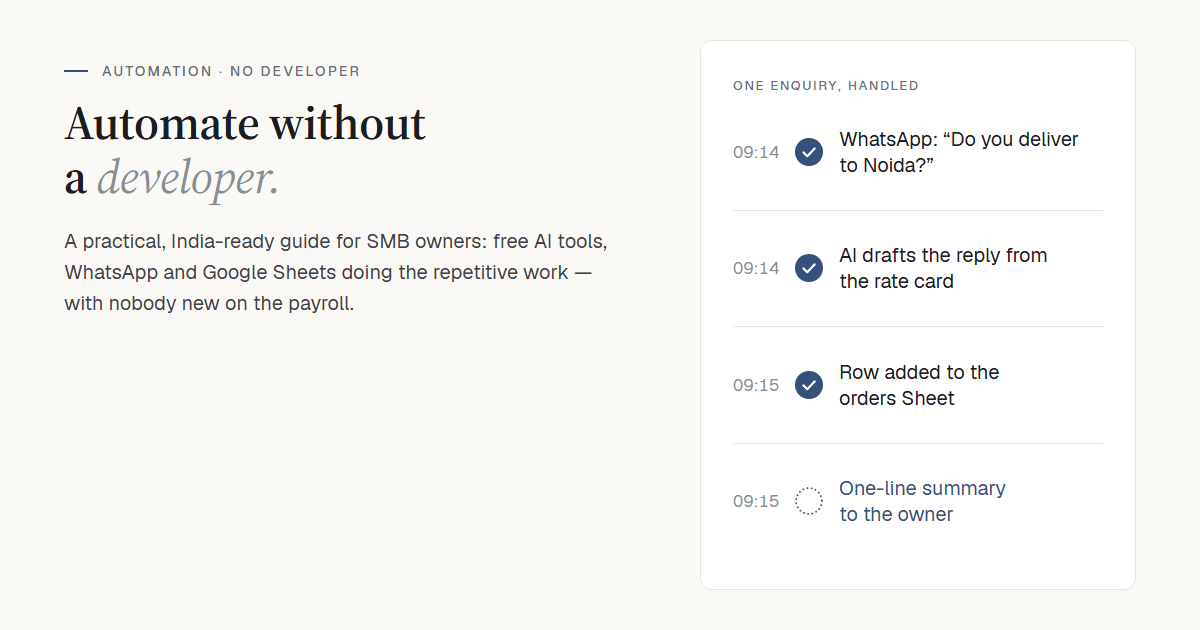
Can you automate your business without hiring a developer or buying expensive software? Yes — and in 2026 it is easier than it has ever been. The tools you need to start are free, already on your phone, and need no code. The real obstacle is rarely the technology. It is knowing where to start. Here is a practical, India-ready way in.
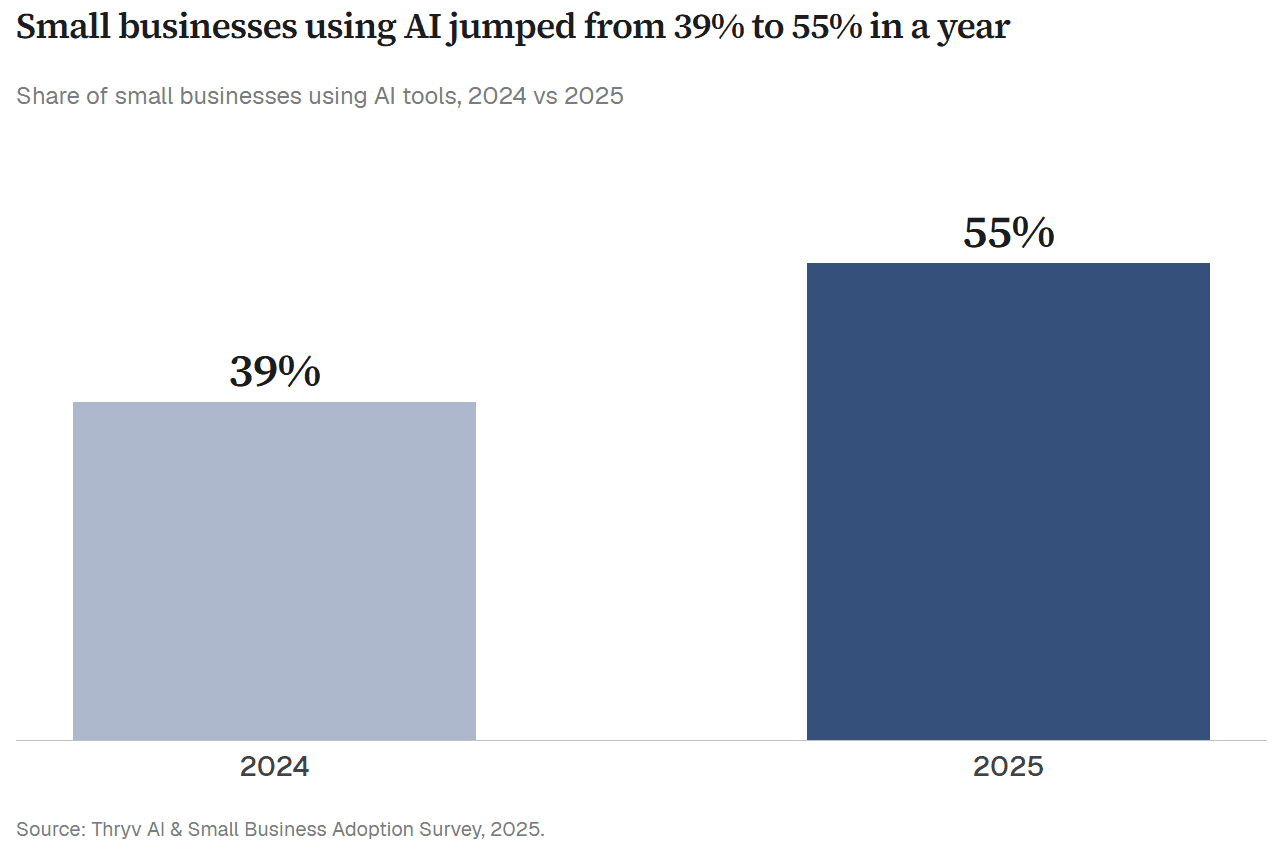
Thryv, a Dallas-based software company, surveyed 540 small-business decision-makers in May 2025: 55% said they were using AI, up from 39% a year earlier (Thryv, 2025). In India, a LinkedIn study carried out by YouGov among 1,027 SMB owners and senior managers in 10 cities, reported in November 2025, found 95.6% already investing in AI or planning to adopt it. The same study put Delhi at 61% for adopting AI to manage costs (Business Standard).
The real question is which single task to point AI at first.
Start with the channel you already use
For many Indian businesses, work runs on WhatsApp. India is WhatsApp's largest market: industry estimates put it at more than 850 million users, though Meta does not publish a figure for any one country. Meta cites a 2025 Kantar study in which 91% of online adults in India chat with a business every week. So automate the channel you already live in. A free AI assistant can scan a day's WhatsApp enquiries, flag which ones slipped through unanswered, and tell you how long each reply took — without a new system or a new hire.
Manitpal Singh, Director of House of Rasook, a Delhi manufacturer, set this up in a single workshop:
"trust me no need to hire any other resource for it. It is so simple" — Manitpal Singh, Director, House of Rasook
The work gets done, and nobody is added to the payroll.
Treat AI as a solution-making machine, not another tool to buy
The reflex is to buy a separate app for every problem — a CRM here, an invoicing tool there. The smarter move is to treat a general assistant like ChatGPT, Google Gemini or Claude as an engine you point at your own problems. You describe what you need in plain English; it builds the thing.
Harsh Gupta, Director of JB Gupta Enterprises, built a tool that writes his customer quotations on his own ChatGPT subscription. His team uses it free, with no subscriptions of their own:
"I created a tool for creating … quotations that we submit to our customers" — Harsh Gupta, Director, JB Gupta Enterprises
He feeds it the specifications; it returns a finished quotation as a PDF — work that used to swallow hours every week.
"We get not a solution, we get a solution-making machine." — Manitpal Singh, Director, House of Rasook
Your first automation, step by step
Pick one repetitive task and build a single flow you can run with free tools today:
- Acknowledge. Switch on the WhatsApp Business app's free greeting and away messages (Tools → Greeting message, and Tools → Away message). The greeting goes to anyone who messages you for the first time, or after 14 days without contact. The away message covers the hours you mark as closed. New and after-hours enquiries get an immediate reply.
- If your account has it, try Business AI. Since 14-May-2026 Meta has offered Business AI inside the WhatsApp Business app to eligible small and medium businesses in India (Tools → Your Business AI). Meta says it answers customer questions round the clock from your business profile, catalogue and documents, recommends products, captures leads and books appointments, in Indian languages. You can step into any chat, change how it behaves or turn it off. Meta's announcement does not say which businesses qualify or what it costs, and the results it quotes are two businesses' own accounts — so test it on your own enquiries before you rely on it.
- Review. At the end of the day, export the chats that carried enquiries and hand them to a free AI assistant. WhatsApp exports one chat at a time. On Android, open the chat, tap More options → More → Export chat, and choose Without media; WhatsApp's help page has the iPhone steps.
- Follow up. Ask the assistant to flag every unanswered enquiry, how long replies took, and who to chase tomorrow — then keep that list in a Google Sheet.
Before you upload a chat. An exported chat holds your customers' names, phone numbers and messages, and whatever you upload goes to the company that runs the assistant. Its data settings decide what happens to it next, so check them first, and remove or mask phone numbers and anything confidential before you upload. India's Digital Personal Data Protection Act, 2023 makes the business that holds personal data responsible for it, including when another company processes that data on its behalf (Section 8(1)). That duty takes effect in May 2027. Work that way now.
A prompt to start from. Attach the exported chats and paste this, with your own business name in the brackets:
Attached are today's WhatsApp chats between my business and our customers.
In the files, my business appears as "[your business name as it shows in the chat]".

For each chat:
1. Say what the customer asked for, in one line.
2. Say whether we replied, and how long our first reply took, using the timestamps in the file.
3. Mark the chat "Waiting" if the customer's last message has no reply from us.

Then give me one table with these columns:
Date | Customer | What they asked | First reply sent (Yes/No) | Time to first reply | Next action | Owner | Done

Put the chats marked "Waiting" first, oldest first.
Use only what is in the files. If a time or a name is unclear, write "unclear". Do not guess.
Columns for the Google Sheet: Date · Customer · What they asked · First reply sent (Yes/No) · Time to first reply · Next action · Owner · Done. Paste the assistant's table into the sheet each evening, then fill in Owner and Done yourself.
This loop — acknowledge, review, follow up — replaces the daily scramble of scrolling chats and copying details by hand. Get one working, then add the next.
You do not need the WhatsApp Business API for this. Everything above uses the WhatsApp Business app, which is free to download. The WhatsApp Business Platform, the API that chatbots and CRM tools connect through, is a separate product. Meta charges for it per template message, at rates that depend on the type of message and the country. Leave it until you have outgrown the app.
The free AI tools worth starting with
You do not need a budget to begin. Each of these assistants has a free plan:
| Tool | What you get free | Main limit |
|---|---|---|
| ChatGPT (OpenAI) | Unlimited text chats with GPT-6 Luna, subject to OpenAI's abuse safeguards; you can use plugins | File uploads, image creation, voice and deep research are limited; you cannot create plugins |
| Google Gemini | Gemini 4 Hydrogen, image generation and editing, Deep Research, voice (Gemini Live), 15 GB storage | Google says rate limits may apply and gives no figure |
| Claude (Anthropic) | Sonnet and Haiku models, web search, file creation, artifacts, up to five projects | Usage limits that reset every five hours, plus a weekly limit; the Research feature starts on the paid Pro plan |
| Perplexity | Basic searches with sources, with no practical cap; some file uploads | Only a small number of Pro Searches; Perplexity picks the model |
Free plans as listed on each company's own plan page on 20-Nov-2026. They change often, and Google's page was read in its US version, so check what your own account shows.
Start with one. For most owners, ChatGPT or Gemini covers the early wins.
When to pay. Move to a paid plan when you keep hitting the free plan's limits on the same job, not before. As an example of the cost, ChatGPT Go is listed in India at ₹399 a month and ChatGPT Plus at ₹1,999 a month (20-Nov-2026).
Frequently asked questions
Can I automate my business without technical skills? Yes. The AI assistants and WhatsApp tools here need no coding — you describe what you want in plain English.
Are these AI tools really free? Every tool above has a real free plan, enough to test one workflow. Paid plans matter once you keep hitting the limits. In India, ChatGPT Go is listed at ₹399 a month and ChatGPT Plus at ₹1,999 a month (20-Nov-2026).
Do I need the WhatsApp Business API? No. This workflow runs on the free WhatsApp Business app. The WhatsApp Business Platform is a separate product that Meta charges for per template message.
Is it safe to upload customer chats to an AI assistant? Treat it as sharing customer data with another company. Check the assistant's data settings, and mask phone numbers and anything confidential before you upload. India's Digital Personal Data Protection Act makes your business responsible for that data, a duty that takes effect in May 2027.
Start with one workflow
Automation is not about replacing your team. It is about getting the right information to the right person at the right time — and handing yourself back the hours. Don't try to automate everything at once. Pick one workflow this week and build it.
We've trained 325+ business owners across Delhi NCR to do exactly this — hands-on, on their own data. If you'd like to build your first automation with us, take a look at our 2-day workshop, Accelerate Your Profits with AI.
Sources
- Thryv, "AI Adoption Among Small Businesses Surges 41% in 2025" (Business Wire, 17-Jul-2025): https://www.businesswire.com/news/home/20250717239434/en/AI-Adoption-Among-Small-Businesses-Surges-41-in-2025-According-to-New-Survey-from-Thryv
- LinkedIn research on Indian SMBs, as reported by Business Standard (13-Nov-2025): https://www.business-standard.com/industry/news/india-smbs-ai-adoption-linkedin-research-2025-125111301671_1.html
- The same research, with its method (YouGov, 1,027 respondents, 10 cities), as reported by IndianWeb2 (13-Nov-2025): https://www.indianweb2.com/2025/11/9-in-10-indian-smbs-now-bet-on-ai-with.html
- Business Standard, "From chats to commerce: why India is WhatsApp's most important market" (23-Jun-2026): https://www.business-standard.com/industry/news/from-chats-to-commerce-why-india-is-whatsapp-s-most-important-market-126062300733_1.html
- Meta, "Introducing Business AI on WhatsApp for Small Businesses in India" (14-May-2026), including the Kantar figure: https://about.fb.com/news/2026/05/introducing-business-ai-on-whatsapp-for-small-businesses-in-india/
- WhatsApp Help Center, greeting messages: https://faq.whatsapp.com/501866148528310
- WhatsApp Help Center, away messages: https://faq.whatsapp.com/2565868990219715
- WhatsApp Help Center, "How to export your chat history": https://whatsapp.com/faq/en/android/23756533
- WhatsApp Blog, "Introducing the WhatsApp Business App": https://blog.whatsapp.com/introducing-the-whats-app-business-app
- Meta for Developers, pricing on the WhatsApp Business Platform: https://developers.facebook.com/docs/whatsapp/pricing
- ChatGPT plans and pricing: https://chatgpt.com/pricing
- Google Gemini plans: https://gemini.google/subscriptions/
- Claude plans and pricing: https://claude.com/pricing
- Perplexity Help Center, "Which Perplexity subscription plan is right for you?": https://www.perplexity.ai/help-center/en/articles/11187416-which-perplexity-subscription-plan-is-right-for-you
- Digital Personal Data Protection Act, 2023, Section 8: https://www.dpdpa.com/dpdpa2023/chapter-2/section8.html
- Press Information Bureau, backgrounder on the Digital Personal Data Protection Rules, 2025 (17-Nov-2025): https://static.pib.gov.in/WriteReadData/specificdocs/documents/2025/nov/doc20251117695301.pdf
Facts checked on 20-Nov-2026.
Related articles
Put this to work in your own business
We train 325+ owners across Delhi NCR hands-on, on their own data — in 2 days.